Showing posts with label Facebook. Show all posts
How to Hide Mobile Number on Facebook?

How to Hide Mobile Number on Facebook?

How to Hide Mobile Number on Facebook?

How to Hide Mobile Number on Facebook?


Today we will talk about how to hide your mobile number on Facebook? This is a time in which almost every person wants to be digital. Everyone wants to stay in touch with family and friends in their Smartphone and Laptop PC. Every day thousands of new users are being created on FB. Our private information is on the Facebook account. The new user does not know that anyone can see the details entered in their profile. Nearly 90% of people keep their phone numbers in their Facebook profile, which will be easily detected by anyone.

Some options have been given for security and privacy on Facebook. Very few FB users know about it. To whom you have to show your profile information and whom not, it is up to you. Especially, everyone wants to hide the mobile number in their profile. For girls, the settings for loading the mobile number on Facebook are very useful. No girl from Kiyu would want any unknown person to know her contact number or personal details. Now if you do not want your privacy to come in front of the world or if someone knows the mobile number from Facebook, then read this post completely.

How to hide your mobile number on Facebook account?

The option to hide Mobile Number in Facebook Account has been given for your protection. Some people do not private their details due to a lack of information. They do not know that their account gets hacked with the help of all this information. If a hacker gets all the information entered into your FB account, then it will be very easy to break the password. If you have not yet hidden the mobile number on the FB, you may be in big trouble.

Disadvantages of not hiding Mobile Number on Facebook Account

If the number from which the account has been created is visible in the profile, then easily anyone will take over your Facebook account. Understand how this can happen.

  • The number you use when creating a new Facebook account. It uses Username to log in.
  • The hacker will use your mobile number in the username. He just needs to crack your account password.
  • You have created an account by email, and have entered any mobile number in profile details. If anyone knows this too, there will be a danger for you.
  • By going to the option of Forgot Password, you will recover your account by entering your details and mobile number.
From the point of view of security, along with hiding your mobile number on Facebook, personal details and friends list should be hidden from the public. This is all the information, which is enough to get your Facebook account hacked. Let's know facebook par Apna mobile number Kaise hide kare?

How to hide your number on Facebook? 


Hide mobile number in FB account is a very easy task. Just understand all the steps given here and follow them carefully. Any problem or question you can comment and tell me.

  1. To hide the mobile number, open your Facebook app and go to the profile section and click on the About option.
  2. All the details entered in the account will come in front of you, click on Contact Info in it.
  3. As soon as you click on the contact info, an option to edit will come, you click on it.
  4. Click on the option of the settings in front of the mobile number. A small pop up window will open, tap and select Only me in it.
  5. Congratulation has now become Mobile Number Hide on FB. This will not be seen by your friends and any other. If you want to be visible in front of friends, then you can choose the option with friends.
Facebook auto liker – Top 5 autolikers August 2019

Facebook auto liker – Top 5 autolikers August 2019

Facebook auto liker – Top 5 autolikers August 2019

Do you feel covetous when your friends or relatives grab more likes for their Facebook post than yours? Do you also need an enormous amount of likes for your photos or status you update? Then you are one right page which certainly helps you to hike up your Facebook likes automatically. Auto liker helps you to grab unlimited likes, followers, and free friend requests automatically for free. The procedure for getting an auto like is simple. All you have to do is copy the URL of the profile picture on Facebook auto liker. Some website has auto likes without access token feature, so use those websites and check your experience.
Facebook auto liker

Do Facebook auto liker websites and app harmful?

When I give a detailed explanation of auto liker websites for increasing FB likes, I think it is sincere to say that sometimes these websites may harm your Facebook account. As Facebook warns, this is not the right method to gain likes for your updates. If a user crosses the narrow sea of using auto liker websites, sometimes it might cause irreparable disability or sometimes your account may get restricted on Facebook. In addition to this, some auto liker website may disclose your identity to third parties. Before continue using Fb autoliker, please read the issues of using these third party websites.

#1:- High Chance for a temporary ban

There is a high risk that your account may suffer a temporary ban as Facebook is keen to all those spammers and fake account holders. It is good only if you keep a friendly atmosphere with others for a successful online business and Facebook knows it better than anyone. Let me give you some side effects of temporary ban:
  1. Blocking from posting in groups.
  2. Blocking from commenting and giving likes to photos and status.
  3. Permanent disabling of your account.
Twice you hit temporary ban, your account is strictly monitored for further actions. Once they found small offenses in the future, they will permanently block your account. They will never give it back nor reply to your emails. If you were connected your Credit Cards or other personal identification, you will not able to create another account with same ID’s. So be cautious.

#2:- You became No.1 spammer to your friends

An auto liker website or app promotes itself or paid ads automatically by sharing links, photo, status to your own or your friends' timeline while you are using it. These things happen on the name of your own personal account, disgusting right? And at last, there is a big chance that you may hold the first position of the best spammer to your friends.
Let me explain this with an example. There will be hundreds or thousands of people, connected to an autoliker website or app. All of them do some actions (Like, Comment, Share, Follow, etc) each other automatically. So you do these actions for others and get these actions back. While making likes and comments on other posts, your friends get a notification. Sometimes the content you like or share may be adult or another inappropriate one. Definitely, you will be the No. 1 spammer to your friends.

#3:- Your Account may get hacked

An auto liker app or website uses access token for login procedure. And when you people are using this, the Facebook notifies you with a security warning saying that these access tokens are treated as your password. Additionally, you will be giving likes and comments for photos and status of people that you even don’t know might be people from other nations. If it happens, you are hacked!
There is some website asking you to log in to Facebook account through their websites for using autolikers. There will be a login form which looks like Facebook. But those fields steal your credentials. Access tokens you serve to these websites will get expired after a couple of hours. Still, if you are liking and sharing others stuffs its clear stage of account misuse. You can check your activity log for more details. So I strongly recommend you to change your password after using auto likers.

#4:- Auto liker Likes are easily noticeable and may affect your reputation

I think from above all effects, this one stands apart. If one of your close friends get a sudden hike in likes for his or her updates on Facebook, certainly you feel doubtful and if you come to know that it is because of auto liker websites or apps, will you have the same respect for your friend as before? Absolutely NO.
So what is the solution? It is better not to use Facebook auto liker for your original account. Using the token number to get likes is also not safe as these websites may use that token number to access that account, a procedure which equals hacking. So here in this article, I am going to discuss some of the best auto liker websites which can make your friends envious on you.

Best Autoliker Websites that can quickly boost your FB likes

Most of these websites are listed based on their Alexa Rank. Good alex rank means the website receiving more traffic. So you will get more likes by using these websites.
#Hublaa.me
Hublaa auto liker is easy to use and is one of the best auto liker websites to grab like to your updates on Facebook. This website is completely spamming free as they are not going to spam on your account. It's free and one hundred percent safe. One can gather almost 250 plus instant likes for your profile photo or status. Yet another feature of customizing like is also added to Hublaa which will allow one to get 20-200 likes per one to submit. Additionally, one can select custom post liker, auto custom photo liker too. Moreover, Hublaa comes with auto liker app for android users, interesting right?
#4liker.com
My second pick from the list is 4liker.com which can hike your post likes within in a go. It is a hundred percent safe Facebook auto liker website which would give 350 plus likes or 50 plus comments on each Facebook status of yours. One can also get likes on fan page status, photo or on custom post. They use secure hosting and also they check the advertiser pages before using their services. Additionally, they come with customer support which makes this auto liker website different from others. For a faster login, one can download the app from google play store.
#Djliker.com
Another auto liker website rolls out in the market which can provide auto likes to your profile picture, status videos and more. In an effortless way, they can provide at least 300 plus like for each post. Also one can increase their likes at most to 20000 for every single post. If you are an Android user you can download dj liker app which can give fast and safe auto likes. It also provides multi comments on a public post. The customer support feature adds to the excitement of getting auto likes.
#Machineliker.com
Machine liker is another auto liker website which cost nothing when you snatch likes and comments for your Facebook updates. They claim that you don’t have to take the trouble of deleting unwanted posts as there is no picture of disclosure, no selling of your data and no logging unwanted data. You can get likes almost up to 15K while using this service. One has to make sure that your Facebook followers are enabled while getting likes. If you see, “404 not found”, it means that you are able to access token and can generate unlimited likes. They also provide an application for android users.
#WefBee.com
This is a little bit different Facebook auto liker website as it provides Facebook tools like Facebook Auto Follower, Facebook Auto Requester, Multi-Group And Page Poster, Auto liker/Auto Comments and many more in free. Facebook auto requester tool will add several friend requests to your account and you can show your demand and popularity by using the tool. Auto page poster tool allows you to share your text/image/link post in multiple pages in 1 click.
Apart from the above list of autolikers, there are other well-known working websites. You can also check the following websites a try.
  • https://jioliker.com
  • http://www.bugsliker.com
  • https://www.autolikesfree.net
  • http://www.m-autoliker.com
  • http://www.autoreactions.com
So these are the best picks from my part and all the mentioned Facebook auto liker sites can amuse anyone with its capability to gain likes for a single post. Now don’t be resentful on others, let them get greedy of likes that you seize

10 Best Cool Facebook Tricks Every Facebook User Should Know

10 Best Cool Facebook Tricks Every Facebook User Should Know

10 Best Cool Facebook Tricks Every Facebook User Should Know

https://www.technosam.site/2019/03/10-best-cool-facebook-tricks-every.html

Facebook is the most popular social media platform out there and even though many other social media platforms have risen in the past couple of years to challenge its authority, Facebook has retained its numero uno position. You might love it or hate it but chances are, you use it a lot and that means, a few tricks should always come in handy. I love these tricks as not only they allow me to get the most out of my Facebook account, but they also allow me to do some pretty cool things which I love. So, if you also want to make the most of your Facebook, here are the 10 best Facebook tricks that you should know about.


1. Check How Much Time You Spend on Facebook

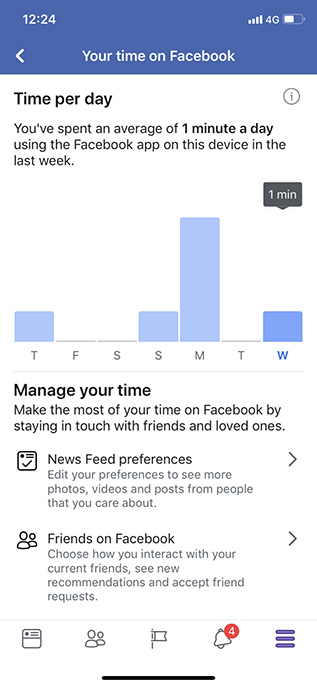
If you’re concerned with how much time you’re spending on Facebook, you’ll be glad to know that instead of relying on third party apps, or waiting for your phone to get Digital Wellbeing or Screen Time features, you can use the Facebook app to check how much time you’re spending on it. Facebook shows a handy bar graph of your usage of the app over the last week along with your average usage time.
10 Best Cool Facebook Tricks Every Facebook User Should Know


2. Limit Your Facebook Usage


If you used the last trick to figure out how much time you’re spending on Facebook and were surprised to see a very high number there, well, rest easy because you can try and limit your usage of Facebook as well. There are a bunch of ways to do that actually.
From the Facebook App:
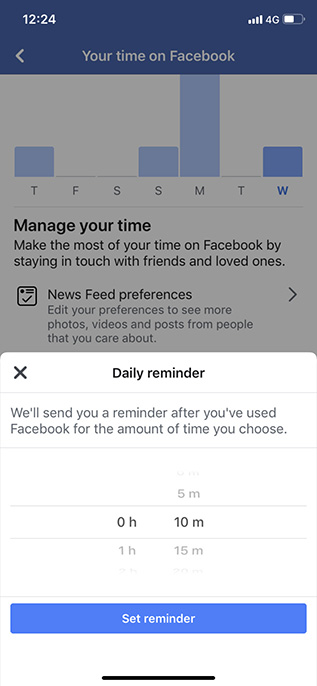
Where you see the time you’re spending on Facebook, there’s an option to set a reminder after which the app will inform you that you’ve spent enough time on Facebook. That can be handy, but it can also be easily bypassed.
10 Best Cool Facebook Tricks Every Facebook User Should Know
Use Digital Wellbeing or Screen Time to Limit Facebook Usage:
If you want to implement a more strict time limit on your Facebook usage, you can use either Screen Time (if you’re on iOS), or Digital Wellbeing (if you’re on a supported Android Pie device) to do this. Both of these features allow users to set time limits on specific apps which should definitely help you limit your Facebook usage.

3. Bulk Delete Third Party Apps from Your Account

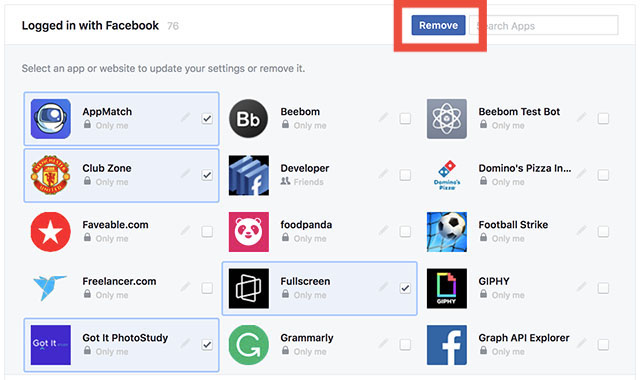
A lot of websites, online games, and apps offer the ability to log in with your Facebook account, and while you may have done that a bunch of times without putting too much thought into it, if you’re worried about such apps stealing or misusing your data, well you can delete them from your account. What’s better is that you don’t have to delete every app individually; you can actually select all the third party apps you want to delete, and get rid of them in a single click. It’s pretty easy and you can check out our article on bulk deleting third party apps from a Facebook account if you need help.
10 Best Cool Facebook Tricks Every Facebook User Should Know

4. Control Notifications Like a Pro (Android Only)


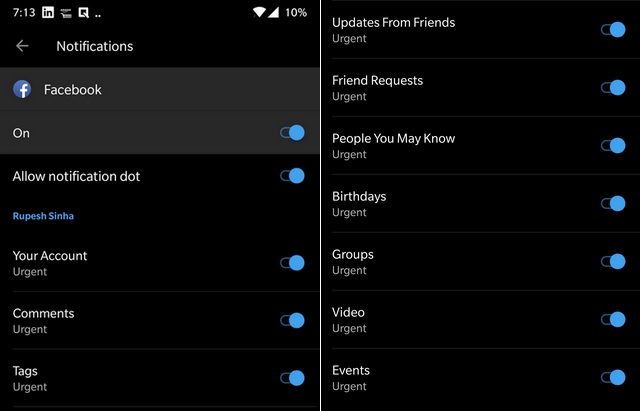
With Android Oreo, Google started rolling out Notification Categories allowing app developers to put more notification controls in the hands of the users. Facebook adopted this back in August and if you’re using an Android phone running Oreo or higher, you can make use of these notification categories to control what kind of Facebook notifications you receive and even control their priorities. There are notification categories for birthdays, people you may know, groups, videos, and a lot more.

10 Best Cool Facebook Tricks Every Facebook User Should Know

5. Find All the Photos Liked by You and Your Friends

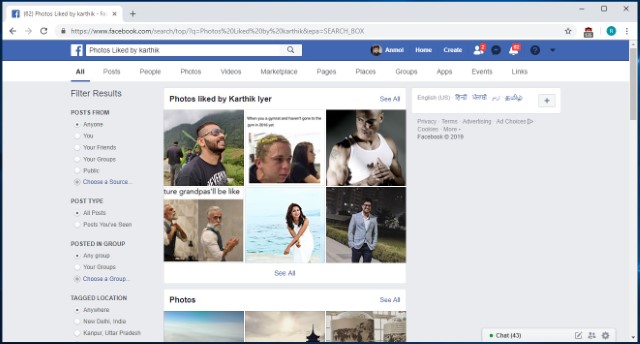
This is a fun nifty Facebook trick that not many people know about. Basically, this feature allows users to see which pictures they have liked in the past. In fact, you can even use this feature to see which photos your friends have liked. The best part is that the trick is pretty easy to execute. Just click on the search bar at the top and type in “Photos Liked by” followed by either “me” or the “name of your friend”. For example, in the picture below, I have searched for “Photos liked by Karthik”, and Facebook is showing me the collection of photos that Karthik has liked.

10 Best Cool Facebook Tricks Every Facebook User Should Know

6. Re-watch the Content that You Missed by Accidental Refresh


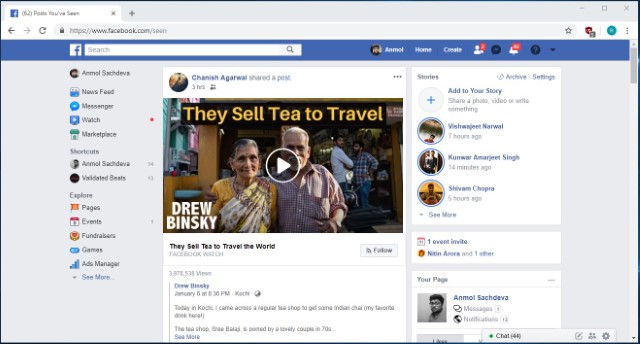
I don’t know how many times I have accidentally refreshed my Facebook feed only to curse myself later as the post that I was looking at was lost. Well, with this trick, you will be able to see the feeds that you have lost due to any accidental refresh. When we accidentally refresh our Facebook feed, Facebook considers that the current feed is already consumed by you and marks it as seen. You can access this feed by going to Facebook and adding “/seen” at the end of the normal URL. So basically you can simply visit the “www.facebook.com/seen” URL to see the content that you have missed.

10 Best Cool Facebook Tricks Every Facebook User Should Know

7. Download your Facebook data

If you have been using Facebook for a number of years now, your account must pack-in tons of your personal data like photos, videos, posts, messages, info and more. And the good thing is Facebook lets you download all of your profile data.
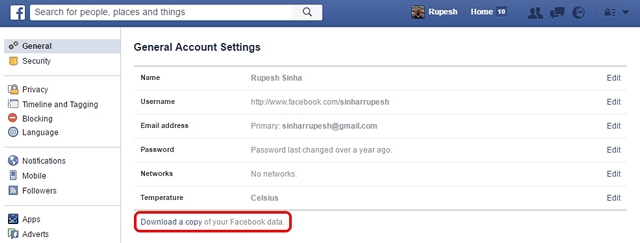
To do it, just head over to Facebook Settings and in the “General” tab, you should see an option at the bottom saying “Download a copy of your Facebook data“.
10 Best Cool Facebook Tricks Every Facebook User Should Know

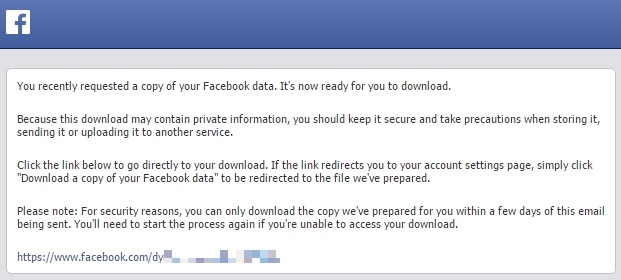
Then, click “Start My Archive“, after which Facebook will prompt you to enter your password again, as a security measure. Facebook will then gather all your data and send you an email once the download is ready.
10 Best Cool Facebook Tricks Every Facebook User Should Know

8. Watch Facebook Videos With Your Friends

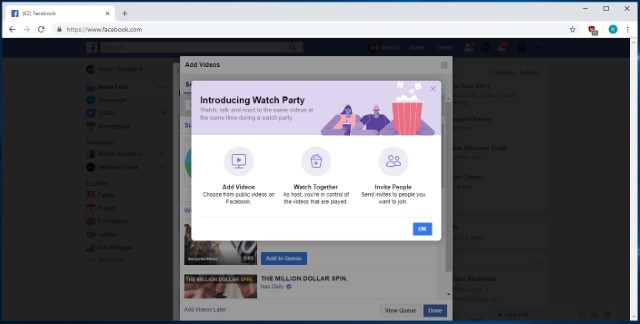
Facebook Watch Party is a new feature from the social media giant which aims at bringing collaborative viewing for distant friends. The feature basically allows users to create a watch party group, where all the members will be able to watch any public videos on Facebook in real time. There are various ways to create a watch party, with the easiest being from your home page. Just click on the “create a post” area and then click on the three-dot menu. From here, click on the “Watch Party” button and follow on the on-screen instructions to invite the friends that you want to watch videos with. It’s a cool way to enjoy your favorite videos with friends and I kind of love it.

10 Best Cool Facebook Tricks Every Facebook User Should Know


9. Search for Open Jobs in Your Area


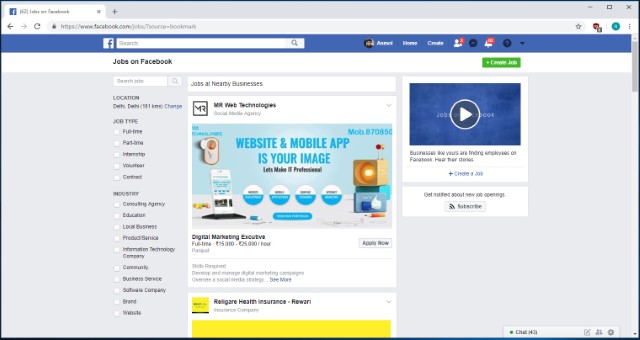
Slowly and slowly, Facebook is trying to branch away from just being a social media platform as it is starting to offer more and more services. One of those new services is the ability to look for open jobs in your area. The number of people who are looking for and getting jobs from Facebook is increasing year over year and you should not miss this train. The “Jobs” page is hosted under the “Explore” section of Facebook (Click on the “See More” button if you don’t see it), and you can click on it to see jobs posted in your area. While this feature is still in its starting stage, you can find some quality job postings here.

10 Best Cool Facebook Tricks Every Facebook User Should Know

10. Create Fund-Raising Programs


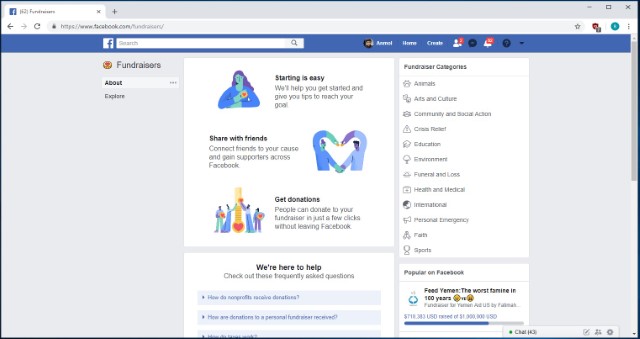
This trick is one of the newest additions to Facebook and it is for a good cause. The feature basically allows users to start fund-raising campaigns and donate to other programs if they want to. The option to create a fund-raising program can be found under the “Explore” section as “Fundraisers“. Once you click on this option, you will be taken to the fund-raiser page where you will be given step-by-step directions to create your fundraiser program. Here, you will also find the links to programs that are already running so that you can donate to them if you agree with the cause.
10 Best Cool Facebook Tricks Every Facebook User Should Know
https://www.technosam.site/2019/03/10-best-cool-facebook-tricks-every.html


Is anyone visiting your Facebook profile? Find out the way!

Is anyone visiting your Facebook profile? Find out the way!

We may not know who your Facebook profile is and who is visiting. But many of them may wish to know which of your friends is making your profile boggling. Maybe you did not know about this now, but you can easily find out who actually visited your profile.
Image result for visiting your Facebook profile
Below are how to find out your Facebook profile visitor step by step
1) First of all, log in to Facebook and click on your name.
2) Now click on the right mouse button on the left side of the screen.
3) Now click on 'view page source', a new page will appear in which many code will be written.
4) Now go to the new page and press Ctrl + F to see a search box will appear.
5) Now type 'InitialChatFriendsList' inside this box and press Enter.
6) Now you have a number of numbers in the code beside the InitialChatFriendsList text.These numbers are all information about your profile recently visited.
7) Now copy the number to the dash (-) before going to your Facebook profile at www.facebook.com/  after the '/' slash of url and press enter.
Now you see that your profile who has visited has opened its profile. In this way, copy the next numbers and paste them into the profile of those who have recently visited your profile.